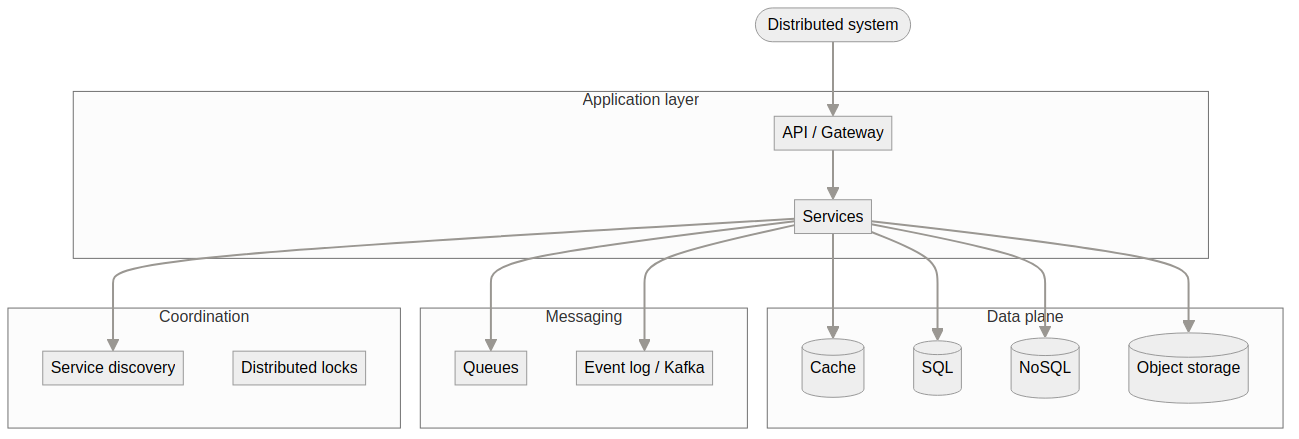
A reference guide to common categories in distributed system design, the typical components in each category, and their common usage. Use this as a mental checklist when tackling system design interviews or architecting real systems.
How to read this map: Start with the ecosystem diagram below, then use the category tables as a lookup when a design needs messaging, storage, coordination, or search.
High-level ecosystem — every large design combines pieces from multiple boxes.
Component Reference by Technology
Systematic breakdown by category, representative technologies, and typical usage. Use these tables when you need to name concrete systems (e.g. “Kafka for event streaming”) rather than abstract concepts.
The sections below organize the same ecosystem by concepts (consistency, partitioning, fault tolerance) rather than by technology. Use them to reason about trade-offs and to answer “how” questions (e.g. how do you shard? how do you handle failures?).
When to mention: Background processing, batch vs real-time, resource and cost optimization.
How to Use This in an Interview
Clarify requirements — Then map them to categories above (e.g. “strong consistency” → Consistency & Replication; “10M QPS” → Partitioning, Load Balancing, Storage).
Name categories first — e.g. “We need replication, partitioning, and a message queue,” then drill into specific items.
Justify choices — For each item, briefly say why (e.g. “Eventual consistency because reads can be stale and we need low latency”).
Trade-offs — Refer back to categories when discussing trade-offs (e.g. consistency vs availability, sync vs async replication).
Quick Reference: Category → Typical Questions
Category
Interview angles
Consistency & Replication
How do you replicate across regions? How do you resolve conflicts?
Partitioning
How do you shard? How do you avoid hot partitions?
Messaging
How do you decouple services? How do you guarantee delivery?
Coordination
How do you elect a leader? How do you implement a distributed lock?
Storage
Why this DB? How do you scale reads/writes?
Load Balancing
How do you scale out? How do you do canary releases?
Fault Tolerance
How do you handle failures? How do you make retries safe?
Security
How do you authenticate/authorize? How do you rate limit?
Observability
How do you debug in production? How do you define SLOs?
Compute
How do you run background jobs? How do you orchestrate workflows?
System Scale Analysis
Concrete throughput, capacity, and scale numbers help you sanity-check designs and answer “how big can this get?” in interviews. Numbers below are indicative (hardware, config, and workload vary); use them as order-of-magnitude references.
Messaging & Event Streaming
System
Typical scale (setup)
Notes
Kafka
~100K–600K+ msg/s per broker; ~100–600+ MB/s write throughput on a 3-broker cluster (e.g. 8 vCPU, NVMe, tuned producer)
Single broker: ~25–95+ MB/s with batching/compression. Cluster scales linearly with brokers. p99 latency ~5 ms at ~200 MB/s. Tuning: batch.size, linger.ms, compression.type=lz4, acks=1 for throughput.
RabbitMQ
~10K–50K msg/s per node (small messages); lower for large payloads
Throughput depends on message size, persistence (disk vs RAM), and cluster size. Use for moderate throughput and flexible routing.
Google Pub/Sub
~1M msg/s per topic (managed; scales with partitions and subscribers)
Fully managed; throughput and retention are service limits, not single-machine limits.
Databases
System
Typical scale (setup)
Notes
PostgreSQL
No hard DB size limit; single table up to ~32 TB (default 8 KB block size); single field up to 1 GB
Practical limit is disk and performance. Single instance: often hundreds of GB–few TB before sharding/read replicas. Extensions (e.g. Citus) add sharding for larger scale.
MySQL
Single table ~64 TB (InnoDB); practical single-instance ~1–10 TB depending on workload
Scale via read replicas, then sharding or Vitess/ProxySQL for very large datasets.
Redis (single node)
~100K–1.2M ops/s per node (simple GET/SET); ~1M+ RPS on larger instances (e.g. r7g.4xlarge)
Cluster: linear scaling (e.g. ~10M ops/s on 6 nodes, ~200M ops/s on 40 nodes with Redis Enterprise). Sub-ms latency typical.
DynamoDB
~3K–10K WCU per partition (write); ~3K–10K RCU per partition (read); auto-scaling and partition splitting
Throughput and storage scale with partitions; no fixed “max DB size”—pay per request and storage.
Cassandra
Linear write scaling with nodes; ~10K–30K+ writes/s per node depending on schema and hardware
No single “max size”; cluster size and replication factor determine capacity. Proper data modeling and vnodes (e.g. 4–16 tokens per node) matter.
MongoDB
Single replica set ~TB range; sharded clusters 100+ TB with many shards
Throughput scales with shards and read preference (primary vs secondaries).
Caching & In-Memory
System
Typical scale (setup)
Notes
Redis
See Databases above; ~100K–1M+ ops/s per node, sub-ms latency
Same product used as cache and as KV store; cluster mode for horizontal scale.
Memcached
~100K–500K+ ops/s per node (GET-heavy)
Simpler than Redis; multi-threaded; no persistence. Scale by adding nodes.
Storage Systems
System
Typical scale (setup)
Notes
AWS S3
Unlimited objects and total size; 3,500 PUT / 5,500 GET per second per prefix (request rate best practices)
Scale by prefix design (shard prefixes for higher aggregate throughput). No single “max bucket size.”
HDFS
PB-scale with hundreds/thousands of nodes; single NameNode metadata in millions of files
Throughput scales with DataNodes and replication; block size (e.g. 128 MB) affects large-file throughput.
Search & Analytics
System
Typical scale (setup)
Notes
Elasticsearch
~10–50 GB per shard recommended; <200M documents per shard; ~1000 shards per (non-frozen) data node default
Total cluster size = nodes × shard capacity. Oversharding hurts performance; scale by adding nodes and reindexing/shrinking if needed.
ClickHouse
TB–PB per cluster; billions of rows per table; high compression
Optimized for analytical queries; throughput depends on schema, compression, and hardware.
Coordination & Configuration
System
Typical scale (setup)
Notes
ZooKeeper
~10K–100K+ ops/s for reads; writes lower (consensus); KB–MB for znodes
Suited for metadata and coordination, not bulk data. Scale by ensemble size (3, 5, 7 nodes typical).
etcd
~10K+ writes/s (small values); ~100K+ reads/s; multi-GB storage per cluster
Used by Kubernetes; scale by cluster size and resource limits.
Why Scale Numbers Matter in Interviews
Sizing: “We need 1M events/s → Kafka with N brokers” or “We have 50 TB → PostgreSQL + Citus or Cassandra.”
Bottlenecks: “Single Redis node caps at ~1M ops/s; we’ll need a cluster for 10M.”
Trade-offs: “PostgreSQL single table is 32 TB; beyond that we shard or move to a distributed store.”
Realism: Avoid “Kafka can do infinite throughput” or “PostgreSQL can’t hold more than 1 GB”—use order-of-magnitude numbers instead.
This ecosystem view helps you structure your answer (by category), recall standard building blocks (items), and explain their use in a given design. The component reference gives you concrete technology names; the conceptual categories help you reason about trade-offs; the scale analysis grounds designs in realistic numbers. Keep this as a mental map when practicing system design problems.