Introduction
Redis (Remote Dictionary Server) is an open-source, in-memory data structure store that serves as a database, cache, message broker, and streaming engine. Since its initial release in 2009, Redis has become one of the most popular NoSQL databases, powering millions of applications worldwide.
#<div class="post-reading-tip" markdown="1">
How to read this guide: Start with the architecture diagram, then use sections as reference during system design interviews when this technology appears in a design.
</div>
What is Redis?
Redis is a key-value store where keys are mapped to values, but unlike simple key-value stores, Redis values can be complex data structures including:
- Strings
- Lists
- Sets
- Sorted Sets
- Hashes
- Bitmaps
- HyperLogLogs
- Streams
- Geospatial indexes
Why Redis?
Key Advantages:
- Speed: Sub-millisecond latency due to in-memory storage
- Versatility: Multiple data structures for various use cases
- Simplicity: Simple API and easy to use
- Persistence: Optional persistence to disk (RDB, AOF)
- Scalability: Horizontal scaling with Redis Cluster
- Rich Features: Pub/Sub, Lua scripting, transactions, streams
Common Use Cases:
- Caching layer for databases
- Session storage
- Real-time leaderboards
- Rate limiting
- Pub/Sub messaging
- Job queues
- Real-time analytics
- Geospatial applications
Redis Architecture
High-Level Architecture
Architecture at a glance
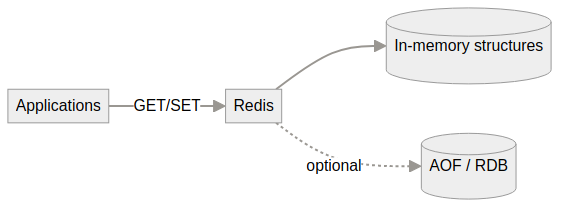
Visual overview — expand optional ASCII detail below if present.
┌─────────────┐     ┌─────────────┐     ┌─────────────┐
│   Client    │────▶│   Client    │────▶│   Client    │
│ Application │     │ Application │     │ Application │
└──────┬──────┘     └──────┬──────┘     └──────┬──────┘
       │                    │                    │
       └────────────────────┴────────────────────┘
                            │
                            │ Redis Protocol
                            │
                            ▼
              ┌─────────────────────────┐
              │   Redis Server          │
              │                         │
              │  ┌──────────┐           │
              │  │ Event    │           │
              │  │ Loop     │           │
              │  └────┬─────┘           │
              │       │                 │
              │  ┌────┴─────┐           │
              │  │ In-Memory│           │
              │  │ Data     │           │
              │  │ Store    │           │
              │  └──────────┘           │
              │                         │
              │  ┌───────────────────┐  │
              │  │  Persistence      │  │
              │  │  (RDB/AOF)        │  │
              │  └───────────────────┘  │
              └─────────────────────────┘
Explanation:
- Client Applications: Applications that connect to Redis for caching, session storage, or real-time features (e.g., web servers, microservices, background jobs).
- Redis Server: In-memory data structure store that serves as database, cache, and message broker.
- Event Loop: Single-threaded event loop that processes all commands sequentially, ensuring atomicity.
- In-Memory Data Store: All data stored in RAM for fast access. Supports strings, lists, sets, sorted sets, hashes, and more.
- Persistence (RDB/AOF): Optional persistence to disk using RDB snapshots or AOF (Append-Only File) logs for durability.
Core Architecture
┌─────────────────────────────────────────────────────────┐
│              Redis Server                                 │
│                                                           │
│  ┌──────────────────────────────────────────────────┐    │
│  │         Client Connections                       │    │
│  │  (TCP/IP, Unix Sockets)                          │    │
│  └──────────────────────────────────────────────────┘    │
│                          │                                │
│  ┌──────────────────────────────────────────────────┐    │
│  │         Event Loop (Single-Threaded)             │    │
│  │  (epoll/kqueue, Non-blocking I/O)                 │    │
│  └──────────────────────────────────────────────────┘    │
│                          │                                │
│  ┌──────────────────────────────────────────────────┐    │
│  │         Command Processor                        │    │
│  │  (Parsing, Execution, Response)                   │    │
│  └──────────────────────────────────────────────────┘    │
│                          │                                │
│  ┌──────────────────────────────────────────────────┐    │
│  │         In-Memory Data Store                      │    │
│  │  (Strings, Lists, Sets, Hashes, etc.)             │    │
│  └──────────────────────────────────────────────────┘    │
│                          │                                │
│  ┌──────────────────────────────────────────────────┐    │
│  │         Persistence Layer                         │    │
│  │  (RDB Snapshots, AOF Logs)                        │    │
│  └──────────────────────────────────────────────────┘    │
└───────────────────────────────────────────────────────────┘
Single-Threaded Event Loop:
- Redis uses a single-threaded event loop model
- All commands execute sequentially (no race conditions)
- I/O operations are non-blocking (epoll/kqueue)
- Background threads handle some operations (AOF fsync, close file descriptors)
Why Single-Threaded?
- Simplicity: No need for locks or synchronization
- Performance: CPU is rarely the bottleneck (network/memory are)
- Predictability: No context switching overhead
- Atomicity: All operations are atomic
Memory Management:
- All data stored in RAM
- Configurable memory limits
- Eviction policies when memory limit reached
- Memory-efficient data structures
Storage Model
In-Memory Storage:
- Primary storage is RAM
- Fast read/write operations
- Limited by available memory
- Data lost on restart (unless persisted)
Persistence Options:
- RDB (Redis Database): Point-in-time snapshots
- AOF (Append-Only File): Logs every write operation
- No Persistence: Pure in-memory (data lost on restart)
Replication Model
Master-Replica Architecture:
- Master: Handles writes and reads
- Replica: Receives replication stream from master
- Asynchronous Replication: Replicas updated asynchronously
- Read Scaling: Replicas can handle read requests
- Automatic Failover: With Sentinel or Redis Cluster
Clustering
Redis Cluster:
- Sharding: Data distributed across multiple nodes
- Hash Slots: 16,384 slots distributed across nodes
- Automatic Failover: Elects new master if master fails
- No Proxy: Direct client-to-node communication
- Linear Scalability: Add nodes to increase capacity
Redis Data Structures
1. Strings
Description: Simplest data type, binary-safe strings up to 512MB.
Operations:
SET key value- Set valueGET key- Get valueINCR key- Increment integerAPPEND key value- Append to stringGETRANGE key start end- Get substringSETEX key seconds value- Set with expiration
Use Cases:
- Caching simple values
- Counters
- Session storage
- Feature flags
Example:
SET user:1000:name "John Doe"
GET user:1000:name
INCR page:views
SETEX session:abc123 3600 "user_data"
Complexity:
- SET/GET: O(1)
- APPEND: O(1)
- GETRANGE: O(N) where N is length of returned string
2. Lists
Description: Ordered collection of strings, implemented as linked lists.
Operations:
LPUSH key value- Add to left (head)RPUSH key value- Add to right (tail)LPOP key- Remove from leftRPOP key- Remove from rightLRANGE key start stop- Get range of elementsLLEN key- Get length
Use Cases:
- Queues (FIFO with RPUSH/LPOP)
- Stacks (LIFO with LPUSH/LPOP)
- Activity feeds
- Message queues
Example:
LPUSH tasks "task1"
RPUSH tasks "task2"
LPOP tasks  # Returns "task1"
LRANGE tasks 0 -1  # Get all elements
Complexity:
- LPUSH/RPUSH: O(1)
- LPOP/RPOP: O(1)
- LRANGE: O(S+N) where S is start offset, N is number of elements
- LLEN: O(1)
3. Sets
Description: Unordered collection of unique strings.
Operations:
SADD key member- Add memberSREM key member- Remove memberSMEMBERS key- Get all membersSISMEMBER key member- Check membershipSINTER key1 key2- IntersectionSUNION key1 key2- UnionSDIFF key1 key2- Difference
Use Cases:
- Unique item tracking
- Tags
- Social graph (followers, following)
- Set operations (intersection, union)
Example:
SADD tags:article:123 "redis" "database" "cache"
SISMEMBER tags:article:123 "redis"  # Returns 1
SMEMBERS tags:article:123
SINTER tags:article:123 tags:article:456
Complexity:
- SADD/SREM/SISMEMBER: O(1) average, O(N) worst case
- SMEMBERS: O(N)
- SINTER/SUNION/SDIFF: O(N*M) where N is smallest set, M is number of sets
4. Sorted Sets
Description: Sets with scores, ordered by score.
Operations:
ZADD key score member- Add with scoreZREM key member- Remove memberZRANGE key start stop- Get range by rankZRANGEBYSCORE key min max- Get range by scoreZRANK key member- Get rankZSCORE key member- Get scoreZINCRBY key increment member- Increment score
Use Cases:
- Leaderboards
- Priority queues
- Time-series data
- Ranking systems
Example:
ZADD leaderboard 1000 "player1"
ZADD leaderboard 950 "player2"
ZRANGE leaderboard 0 9 WITHSCORES  # Top 10
ZRANK leaderboard "player1"
ZINCRBY leaderboard 50 "player1"
Complexity:
- ZADD/ZREM: O(log N)
- ZRANGE: O(log N + M) where M is number of elements returned
- ZRANK/ZSCORE: O(log N)
- ZRANGEBYSCORE: O(log N + M)
5. Hashes
Description: Field-value pairs, like objects or dictionaries.
Operations:
HSET key field value- Set fieldHGET key field- Get fieldHGETALL key- Get all fields and valuesHMSET key field1 value1 field2 value2- Set multiple fieldsHMGET key field1 field2- Get multiple fieldsHDEL key field- Delete fieldHINCRBY key field increment- Increment field
Use Cases:
- User profiles
- Object storage
- Shopping carts
- Configuration storage
Example:
HSET user:1000 name "John" age 30 email "john@example.com"
HGET user:1000 name
HGETALL user:1000
HINCRBY user:1000 age 1
Complexity:
- HSET/HGET/HDEL: O(1)
- HGETALL: O(N) where N is number of fields
- HMSET/HMGET: O(N) where N is number of fields
6. Bitmaps
Description: String type that treats string as array of bits.
Operations:
SETBIT key offset value- Set bit at offsetGETBIT key offset- Get bit at offsetBITCOUNT key- Count set bitsBITOP operation destkey key1 key2- Bitwise operations
Use Cases:
- User activity tracking
- Feature flags
- Bloom filters
- Real-time analytics
Example:
SETBIT user:activity:2024-01-01 1000 1
GETBIT user:activity:2024-01-01 1000
BITCOUNT user:activity:2024-01-01
BITOP AND result key1 key2
Complexity:
- SETBIT/GETBIT: O(1)
- BITCOUNT: O(N)
- BITOP: O(N)
7. HyperLogLog
Description: Probabilistic data structure for counting unique elements.
Operations:
PFADD key element- Add elementPFCOUNT key- Count unique elementsPFMERGE destkey sourcekey1 sourcekey2- Merge HyperLogLogs
Use Cases:
- Unique visitor counting
- Cardinality estimation
- Distinct count approximation
Example:
PFADD visitors:2024-01-01 "user1" "user2" "user3"
PFCOUNT visitors:2024-01-01
PFMERGE visitors:week visitors:mon visitors:tue
Complexity:
- PFADD: O(1)
- PFCOUNT: O(1) with small constant
- PFMERGE: O(N) where N is number of HyperLogLogs
Accuracy: ~0.81% standard error, uses ~12KB per HyperLogLog
8. Streams
Description: Log-like data structure (similar to Kafka), introduced in Redis 5.0.
Operations:
XADD key * field value- Add entryXREAD STREAMS key id- Read entriesXGROUP CREATE key groupname id- Create consumer groupXREADGROUP GROUP groupname consumername STREAMS key id- Read from groupXRANGE key start end- Get range of entries
Use Cases:
- Event streaming
- Message queues
- Log aggregation
- Activity feeds
Example:
XADD events * user_id 1000 action "login" timestamp 1234567890
XREAD STREAMS events 0
XGROUP CREATE events mygroup 0
XREADGROUP GROUP mygroup consumer1 STREAMS events >
Complexity:
- XADD: O(1)
- XREAD: O(N) where N is number of entries returned
- XRANGE: O(N) where N is number of entries returned
9. Geospatial
Description: Sorted sets with geospatial indexing.
Operations:
GEOADD key longitude latitude member- Add locationGEODIST key member1 member2- Distance between membersGEORADIUS key longitude latitude radius unit- Find within radiusGEORADIUSBYMEMBER key member radius unit- Find near member
Use Cases:
- Location-based services
- Nearby search
- Geofencing
- Delivery tracking
Example:
GEOADD cities -122.4194 37.7749 "San Francisco"
GEOADD cities -74.0060 40.7128 "New York"
GEODIST cities "San Francisco" "New York" km
GEORADIUS cities -122.4194 37.7749 100 km
Complexity:
- GEOADD: O(log N)
- GEODIST: O(1)
- GEORADIUS: O(N+log M) where N is number of elements, M is number of items in range
Advanced Features
1. Pub/Sub (Publish-Subscribe)
Description: Messaging pattern where publishers send messages to channels, and subscribers receive messages.
Operations:
PUBLISH channel message- Publish messageSUBSCRIBE channel- Subscribe to channelPSUBSCRIBE pattern- Subscribe to patternUNSUBSCRIBE channel- Unsubscribe
Characteristics:
- Fire-and-forget: No message persistence
- Real-time: Immediate delivery
- Pattern Matching: Subscribe to multiple channels with patterns
- No History: Messages not stored
Use Cases:
- Real-time notifications
- Event broadcasting
- Cache invalidation
- Live updates
Example:
# Publisher
PUBLISH notifications "User 1000 logged in"

# Subscriber
SUBSCRIBE notifications
PSUBSCRIBE notifications:*
Limitations:
- Messages lost if no subscribers
- No message persistence
- No acknowledgment mechanism
2. Transactions
Description: Group multiple commands into atomic operation.
Operations:
MULTI- Start transactionEXEC- Execute transactionDISCARD- Cancel transactionWATCH key- Watch key for changes
Characteristics:
- Atomicity: All commands execute or none
- Isolation: Commands queued, executed together
- Optimistic Locking: WATCH for conditional execution
- No Rollback: No rollback on errors (commands still execute)
Example:
MULTI
INCR counter
SET key value
EXEC

# Conditional execution
WATCH balance
MULTI
DECR balance
INCR account
EXEC  # Fails if balance changed
Limitations:
- No rollback on errors
- Commands queued, not executed immediately
- WATCH provides optimistic locking, not true transactions
3. Lua Scripting
Description: Execute Lua scripts atomically on server.
Operations:
EVAL script numkeys key [key ...] arg [arg ...]- Execute scriptEVALSHA sha1 numkeys key [key ...] arg [arg ...]- Execute by SHA1
Advantages:
- Atomicity: Script executes atomically
- Performance: Script runs on server (no network round-trips)
- Complex Logic: Can implement complex operations
- Caching: EVALSHA for cached scripts
Use Cases:
- Complex atomic operations
- Rate limiting
- Custom data structures
- Batch operations
Example:
-- Rate limiting script
local key = KEYS[1]
local limit = tonumber(ARGV[1])
local window = tonumber(ARGV[2])
local current = redis.call('INCR', key)
if current == 1 then
    redis.call('EXPIRE', key, window)
end
return current <= limit
Limitations:
- Script execution blocks server (keep scripts fast)
- No external calls or I/O
- Limited error handling
4. Expiration (TTL)
Description: Automatically delete keys after expiration time.
Operations:
EXPIRE key seconds- Set expirationTTL key- Get time to livePERSIST key- Remove expirationSETEX key seconds value- Set with expiration
Expiration Strategies:
- Passive: Keys checked on access
- Active: Random sampling of expired keys (10 per second)
Use Cases:
- Session management
- Cache invalidation
- Temporary data
- Rate limiting windows
Example:
SETEX session:abc123 3600 "user_data"
TTL session:abc123
EXPIRE session:abc123 7200
5. Persistence
RDB (Redis Database):
- Snapshot-based: Point-in-time snapshots
- Fork Process: Creates child process for snapshot
- Configurable: Save on time intervals or number of changes
- Fast Recovery: Quick restart from snapshot
- Data Loss: Risk of losing data between snapshots
Configuration:
save 900 1      # Save if 1 key changed in 900 seconds
save 300 10     # Save if 10 keys changed in 300 seconds
save 60 10000   # Save if 10000 keys changed in 60 seconds
AOF (Append-Only File):
- Log-based: Logs every write operation
- Durability: More durable than RDB
- Rewrite: Periodically rewrite to compact
- Sync Options:
always: Sync every write (slowest, most durable)everysec: Sync every second (balanced)no: Let OS decide (fastest, less durable)
Configuration:
appendonly yes
appendfsync everysec
Hybrid Approach:
- Use both RDB and AOF
- RDB for fast recovery
- AOF for durability
6. Replication
Master-Replica Architecture:
- Master: Handles writes, replicates to replicas
- Replica: Receives replication stream, can handle reads
- Asynchronous: Replication is asynchronous
- Read Scaling: Replicas can serve read requests
Setup:
# On replica
REPLICAOF master_host master_port
# Or in config file
replicaof 192.168.1.100 6379
Replication Process:
- Replica connects to master
- Master sends RDB file (full sync)
- Master sends replication stream (incremental)
- Replica applies commands
Use Cases:
- Read scaling
- High availability
- Backup
- Geographic distribution
7. Redis Cluster
Sharding:
- Hash Slots: 16,384 slots distributed across nodes
- Key Hashing: CRC16(key) % 16384 determines slot
- Slot Assignment: Each node handles subset of slots
- Resharding: Move slots between nodes
Architecture:
- No Proxy: Direct client-to-node communication
- Gossip Protocol: Nodes discover each other
- Automatic Failover: Elects new master if master fails
- Linear Scalability: Add nodes to increase capacity
Setup:
# Cluster node configuration
port 7000
cluster-enabled yes
cluster-config-file nodes.conf
cluster-node-timeout 5000
Client Behavior:
- Clients connect to any node
- Node returns MOVED/ASK redirect if key on different node
- Clients cache slot-to-node mapping
- Automatic retry on redirect
Limitations:
- No multi-key operations across slots (unless same hash tag)
- No transactions across slots
- More complex setup and operations
Performance Characteristics
Maximum Read & Write Throughput
Single Node:
- Max Read Throughput:
- Simple operations (GET, SET): 100K-200K ops/sec
- Complex operations (SORT, ZUNIONSTORE): 50K-100K ops/sec
- With pipelining: 1M+ ops/sec
- Max Write Throughput:
- Simple operations (SET, HSET): 100K-200K ops/sec
- Complex operations (multi-key): 50K-100K ops/sec
- With pipelining: 1M+ ops/sec
Redis Cluster (Horizontal Scaling):
- Max Read Throughput: 100K-200K ops/sec per node (linear scaling)
- Max Write Throughput: 100K-200K ops/sec per node (linear scaling)
- Example: 10-node cluster can handle 1M-2M ops/sec total
Factors Affecting Throughput:
- Command complexity
- Data structure size
- Network latency
- Persistence settings (AOF sync mode)
- Memory bandwidth
- Number of nodes (for cluster)
Throughput
Single Node:
- Simple Operations: 100K-200K operations/second
- Complex Operations: 50K-100K operations/second
- Pipelining: Can reach 1M+ operations/second
Factors Affecting Throughput:
- Command complexity
- Data structure size
- Network latency
- Persistence settings (AOF sync mode)
- Memory bandwidth
Latency
Typical Latency:
- Local Network: < 1ms
- Same Data Center: 1-5ms
- Cross-Region: 10-100ms
Factors Affecting Latency:
- Network latency
- Command complexity
- Data structure size
- Server load
- Persistence (AOF sync)
Memory Usage
Memory Efficiency:
- Small Objects: Overhead ~100 bytes per key
- Large Objects: Overhead minimal
- Data Structures: Optimized for memory efficiency
- Compression: Can use compression for large values
Memory Optimization:
- Use appropriate data structures
- Set memory limits
- Configure eviction policies
- Use compression for large values
- Monitor memory usage
Scalability
Vertical Scaling:
- Limited by available RAM
- Single-threaded (CPU rarely bottleneck)
- Can scale to hundreds of GB RAM
Horizontal Scaling:
- Redis Cluster for sharding
- Can scale to thousands of nodes
- Linear scalability
Configuration & Tuning
Memory Management
maxmemory:
maxmemory 2gb
maxmemory-policy allkeys-lru
Eviction Policies:
noeviction: Don’t evict (return errors)allkeys-lru: Evict least recently usedallkeys-lfu: Evict least frequently usedvolatile-lru: Evict LRU among keys with expirationvolatile-lfu: Evict LFU among keys with expirationvolatile-ttl: Evict shortest TTLvolatile-random: Evict random key with expirationallkeys-random: Evict random key
Persistence Configuration
RDB:
save 900 1
save 300 10
save 60 10000
stop-writes-on-bgsave-error yes
rdbcompression yes
AOF:
appendonly yes
appendfsync everysec
no-appendfsync-on-rewrite no
auto-aof-rewrite-percentage 100
auto-aof-rewrite-min-size 64mb
Network Configuration
bind 127.0.0.1
port 6379
tcp-backlog 511
timeout 0
tcp-keepalive 300
Performance Tuning
Disable Persistence (for caching):
save ""
appendonly no
Optimize for Latency:
appendfsync no # Let OS handle sync
Connection Pooling:
- Use connection pools in clients
- Reuse connections
- Limit connection count
Use Cases & Patterns
1. Caching Layer
Pattern: Cache frequently accessed data from database.
Implementation:
# Cache-aside pattern
def get_user(user_id):
    cache_key = f"user:{user_id}"
    user = redis.get(cache_key)
    if not user:
        user = db.get_user(user_id)
        redis.setex(cache_key, 3600, user)  # Cache for 1 hour
    return user
Benefits:
- Reduce database load
- Faster response times
- Cost reduction
2. Session Storage
Pattern: Store user sessions in Redis.
Implementation:
SETEX session:abc123 3600 "user_data"
GET session:abc123
EXPIRE session:abc123 7200
Benefits:
- Fast access
- Shared across servers
- Automatic expiration
3. Rate Limiting
Pattern: Limit number of requests per time window.
Implementation:
# Sliding window
def rate_limit(user_id, limit, window):
    key = f"rate_limit:{user_id}"
    current = redis.incr(key)
    if current == 1:
        redis.expire(key, window)
    return current <= limit
Benefits:
- Prevent abuse
- Fair resource allocation
- Simple implementation
4. Leaderboards
Pattern: Real-time ranking system.
Implementation:
ZADD leaderboard 1000 "player1"
ZADD leaderboard 950 "player2"
ZRANGE leaderboard 0 9 WITHSCORES  # Top 10
ZRANK leaderboard "player1"
Benefits:
- Real-time updates
- Efficient ranking
- Multiple leaderboards
5. Pub/Sub Messaging
Pattern: Real-time message broadcasting.
Implementation:
# Publisher
PUBLISH notifications "User logged in"

# Subscriber
SUBSCRIBE notifications
Benefits:
- Real-time delivery
- Decoupled systems
- Scalable
6. Job Queues
Pattern: Background job processing with reliable delivery and visibility timeout.
Basic Implementation:
# Producer
LPUSH jobs "job_data"

# Consumer
job = BRPOP jobs 0  # Blocking pop
process_job(job)
Benefits:
- Asynchronous processing
- Simple implementation
- Reliable delivery
Task Queue with Visibility Feature
What is Visibility Timeout?
- When a worker receives a task, it becomes “invisible” to other workers
- Worker has a limited time to process the task
- If task not completed within timeout, it becomes visible again
- Prevents task loss if worker crashes
- Allows retry of failed tasks
Implementation Using Redis Lists:
1. Simple Task Queue (Basic):
# Producer: Add task to queue
LPUSH task:queue "{\"task_id\":\"123\",\"data\":\"...\"}"

# Consumer: Get task (blocking)
BRPOP task:queue 0
2. Task Queue with Visibility (Advanced):
Architecture:
┌─────────────┐      ┌──────────────┐      ┌─────────────┐
│  Producer   │─────►│  Task Queue  │─────►│  Consumer   │
│             │      │  (Redis)     │      │  (Worker)   │
└─────────────┘      └──────────────┘      └─────────────┘
                            │
                            ▼
                     ┌──────────────┐
                     │ Processing   │
                     │ Queue        │
                     │ (Visibility) │
                     └──────────────┘
Python Implementation:
import redis
import json
import time
import uuid
from typing import Optional, Dict, Any

class RedisTaskQueue:
    def __init__(self, redis_client: redis.Redis, queue_name: str = "tasks"):
        self.redis = redis_client
        self.queue_name = queue_name
        self.processing_queue = f"{queue_name}:processing"
        self.visibility_timeout = 30  # seconds

    def enqueue_task(self, task_data: Dict[Any, Any]) -> str:
        """Add a task to the queue."""
        task_id = str(uuid.uuid4())
        task = {
            "task_id": task_id,
            "data": task_data,
            "created_at": time.time(),
            "attempts": 0
        }

        # Add to main queue
        self.redis.lpush(self.queue_name, json.dumps(task))
        return task_id

    def dequeue_task(self, timeout: int = 0) -> Optional[Dict[Any, Any]]:
        """
        Get a task from the queue with visibility timeout.
        Task is moved to processing queue and becomes invisible.
        """
        # Blocking pop from main queue
        result = self.redis.brpop(self.queue_name, timeout=timeout)

        if not result:
            return None

        _, task_json = result
        task = json.loads(task_json)

        # Add visibility timeout and move to processing queue
        task["visibility_timeout"] = time.time() + self.visibility_timeout
        task["attempts"] = task.get("attempts", 0) + 1

        # Move to processing queue (sorted set by timeout)
        self.redis.zadd(
            self.processing_queue,
            {json.dumps(task): task["visibility_timeout"]}
        )

        return task

    def complete_task(self, task: Dict[Any, Any]):
        """Mark task as completed and remove from processing queue."""
        task_json = json.dumps(task)
        self.redis.zrem(self.processing_queue, task_json)

    def release_task(self, task: Dict[Any, Any]):
        """Release task back to main queue (for retry)."""
        task_json = json.dumps(task)
        self.redis.zrem(self.processing_queue, task_json)

        # Remove visibility timeout and add back to main queue
        task.pop("visibility_timeout", None)
        self.redis.lpush(self.queue_name, json.dumps(task))

    def requeue_expired_tasks(self):
        """Move expired tasks from processing queue back to main queue."""
        current_time = time.time()

        # Get expired tasks (score < current_time)
        expired_tasks = self.redis.zrangebyscore(
            self.processing_queue,
            "-inf",
            current_time,
            withscores=False
        )

        for task_json in expired_tasks:
            task = json.loads(task_json)
            task.pop("visibility_timeout", None)

            # Remove from processing queue
            self.redis.zrem(self.processing_queue, task_json)

            # Add back to main queue
            self.redis.lpush(self.queue_name, json.dumps(task))

            print(f"Requeued expired task: {task['task_id']}")

    def get_queue_length(self) -> int:
        """Get number of tasks in queue."""
        return self.redis.llen(self.queue_name)

    def get_processing_count(self) -> int:
        """Get number of tasks being processed."""
        return self.redis.zcard(self.processing_queue)


# Usage Example
if __name__ == "__main__":
    # Connect to Redis
    redis_client = redis.Redis(host='localhost', port=6379, db=0)
    task_queue = RedisTaskQueue(redis_client, queue_name="tasks")

    # Producer: Add tasks
    for i in range(10):
        task_data = {"type": "process_image", "image_id": f"img_{i}"}
        task_id = task_queue.enqueue_task(task_data)
        print(f"Enqueued task: {task_id}")

    # Consumer: Process tasks
    def process_task(task: Dict[Any, Any]):
        """Process a task."""
        print(f"Processing task: {task['task_id']}")
        print(f"Task data: {task['data']}")
        print(f"Attempt: {task['attempts']}")

        # Simulate processing
        time.sleep(2)

        # Simulate success/failure
        return True  # or False for failure

    # Worker loop
    while True:
        # Requeue expired tasks periodically
        task_queue.requeue_expired_tasks()

        # Get task from queue
        task = task_queue.dequeue_task(timeout=1)

        if task:
            try:
                # Process task
                success = process_task(task)

                if success:
                    # Mark as completed
                    task_queue.complete_task(task)
                    print(f"Completed task: {task['task_id']}")
                else:
                    # Retry if failed (with max attempts check)
                    if task['attempts'] < 3:
                        task_queue.release_task(task)
                        print(f"Released task for retry: {task['task_id']}")
                    else:
                        # Move to dead letter queue or log
                        task_queue.complete_task(task)
                        print(f"Task failed after max attempts: {task['task_id']}")

            except Exception as e:
                # Handle errors
                print(f"Error processing task {task['task_id']}: {e}")

                # Retry if attempts < max
                if task['attempts'] < 3:
                    task_queue.release_task(task)
                else:
                    task_queue.complete_task(task)
Redis Commands Used:
# Producer: Add task
LPUSH tasks "{\"task_id\":\"123\",\"data\":\"...\"}"

# Consumer: Get task (blocking)
BRPOP tasks 0

# Move to processing queue with visibility timeout
ZADD tasks:processing <timestamp> "{\"task_id\":\"123\",...}"

# Check for expired tasks
ZRANGEBYSCORE tasks:processing -inf <current_timestamp>

# Complete task: Remove from processing queue
ZREM tasks:processing "{\"task_id\":\"123\",...}"

# Requeue expired task: Remove from processing, add to main queue
ZREM tasks:processing "{\"task_id\":\"123\",...}"
LPUSH tasks "{\"task_id\":\"123\",...}"
Features:
- ✅ Visibility Timeout: Tasks become invisible during processing
- ✅ Automatic Requeue: Expired tasks automatically requeued
- ✅ Retry Logic: Failed tasks can be retried
- ✅ Dead Letter Queue: Tasks exceeding max attempts can be handled
- ✅ Monitoring: Track queue length and processing count
- ✅ Reliability: Tasks not lost if worker crashes
Advanced Features:
1. Priority Queue:
def enqueue_priority_task(self, task_data: Dict, priority: int = 0):
    """Add task with priority (higher number = higher priority)."""
    task_id = str(uuid.uuid4())
    task = {
        "task_id": task_id,
        "data": task_data,
        "priority": priority,
        "created_at": time.time()
    }

    # Use sorted set for priority queue
    self.redis.zadd(self.queue_name, {json.dumps(task): priority})
2. Scheduled Tasks:
def enqueue_scheduled_task(self, task_data: Dict, delay: int):
    """Add task to be processed after delay (seconds)."""
    task_id = str(uuid.uuid4())
    task = {
        "task_id": task_id,
        "data": task_data,
        "scheduled_at": time.time() + delay,
        "created_at": time.time()
    }

    # Use sorted set with scheduled time as score
    self.redis.zadd(
        f"{self.queue_name}:scheduled",
        {json.dumps(task): task["scheduled_at"]}
    )
3. Task Status Tracking:
def get_task_status(self, task_id: str) -> str:
    """Get status of a task."""
    # Check main queue
    tasks = self.redis.lrange(self.queue_name, 0, -1)
    for task_json in tasks:
        task = json.loads(task_json)
        if task["task_id"] == task_id:
            return "pending"

    # Check processing queue
    processing = self.redis.zrange(self.processing_queue, 0, -1)
    for task_json in processing:
        task = json.loads(task_json)
        if task["task_id"] == task_id:
            return "processing"

    return "completed"
Comparison with Other Queue Systems:
| Feature | Redis Lists | Redis Streams | RabbitMQ | AWS SQS |
|---|---|---|---|---|
| Visibility Timeout | Manual | Built-in | Built-in | Built-in |
| Message Persistence | Optional | Yes | Yes | Yes |
| Priority | Manual | Yes | Yes | Yes |
| Dead Letter Queue | Manual | Manual | Built-in | Built-in |
| Complexity | Low | Medium | High | Low |
| Performance | Very High | High | Medium | High |
Best Practices:
- Set Appropriate Visibility Timeout:
- Too short: Tasks requeued before completion
- Too long: Delayed retry of failed tasks
- Typical: 30-300 seconds depending on task
- Monitor Queue Length:
- Alert on queue buildup
- Scale workers based on queue length
- Prevent memory issues
- Handle Failures:
- Implement retry logic
- Use dead letter queue for failed tasks
- Log errors for debugging
- Clean Up Processing Queue:
- Periodically requeue expired tasks
- Monitor stuck tasks
- Handle worker crashes gracefully
7. Distributed Locks
Pattern: Coordinate access to shared resources.
Implementation:
# Acquire lock
SET lock:resource "owner" EX 10 NX

# Release lock
if redis.get("lock:resource") == "owner":
    redis.delete("lock:resource")
Benefits:
- Prevent race conditions
- Coordinate distributed systems
- Simple implementation
8. Counting & Analytics
Pattern: Real-time counters and statistics.
Implementation:
INCR page:views
INCRBY user:1000:score 50
BITCOUNT user:activity:2024-01-01
PFADD visitors:2024-01-01 "user1"
Benefits:
- Real-time updates
- Efficient storage
- Fast queries
Local Design Patterns & Common Scenarios
1. Local Cached Queue
Use Case: Use Redis as a local in-memory queue for fast task processing within a single application or service.
Architecture:
┌─────────────────────────────────────────────────┐
│           Application Server                      │
│                                                   │
│  ┌──────────────┐         ┌──────────────┐      │
│  │   Producer   │────────▶│  Redis Queue  │      │
│  │   Thread     │         │  (Local)      │      │
│  └──────────────┘         └──────┬───────┘      │
│                                   │               │
│  ┌──────────────┐                 │               │
│  │   Consumer   │◀────────────────┘               │
│  │   Thread     │                                 │
│  └──────────────┘                                 │
│                                                   │
│  ┌──────────────┐                                 │
│  │   Redis      │                                 │
│  │   (Local)     │                                 │
│  └──────────────┘                                 │
└───────────────────────────────────────────────────┘
Implementation:
import redis
import json
import threading
import time
from typing import Optional, Dict, Any

class LocalCachedQueue:
    """
    Local Redis-based queue for fast in-memory task processing.
    Ideal for single-server applications needing fast task queuing.
    """

    def __init__(self, redis_client: redis.Redis, queue_name: str = "local_queue"):
        self.redis = redis_client
        self.queue_name = queue_name
        self.cache_prefix = f"cache:{queue_name}"
        self.max_cache_size = 1000  # Maximum cached items

    def enqueue(self, task_data: Dict[Any, Any], priority: int = 0) -> str:
        """
        Add task to queue with optional priority.
        Also cache task data for fast retrieval.
        """
        task_id = f"task_{int(time.time() * 1000)}"
        task = {
            "task_id": task_id,
            "data": task_data,
            "priority": priority,
            "created_at": time.time()
        }

        # Add to queue (use sorted set for priority)
        if priority > 0:
            self.redis.zadd(self.queue_name, {json.dumps(task): -priority})
        else:
            self.redis.lpush(self.queue_name, json.dumps(task))

        # Cache task data for fast lookup
        cache_key = f"{self.cache_prefix}:{task_id}"
        self.redis.setex(cache_key, 3600, json.dumps(task_data))

        # Maintain cache size
        self._maintain_cache_size()

        return task_id

    def dequeue(self, timeout: int = 0) -> Optional[Dict[Any, Any]]:
        """
        Get task from queue (blocking or non-blocking).
        """
        # Try priority queue first
        result = self.redis.zpopmax(self.queue_name, count=1)

        if result and len(result) > 0:
            task_json, _ = result[0]
            task = json.loads(task_json)
            return task

        # Fall back to regular queue
        if timeout > 0:
            result = self.redis.brpop(self.queue_name, timeout=timeout)
            if result:
                _, task_json = result
                return json.loads(task_json)
        else:
            result = self.redis.rpop(self.queue_name)
            if result:
                return json.loads(result)

        return None

    def get_cached_task(self, task_id: str) -> Optional[Dict[Any, Any]]:
        """
        Retrieve task data from cache (fast lookup).
        """
        cache_key = f"{self.cache_prefix}:{task_id}"
        cached = self.redis.get(cache_key)
        if cached:
            return json.loads(cached)
        return None

    def _maintain_cache_size(self):
        """Maintain cache size by removing oldest entries."""
        cache_keys = self.redis.keys(f"{self.cache_prefix}:*")
        if len(cache_keys) > self.max_cache_size:
            # Remove oldest 10% of cache
            to_remove = len(cache_keys) - int(self.max_cache_size * 0.9)
            for key in cache_keys[:to_remove]:
                self.redis.delete(key)

    def get_queue_length(self) -> int:
        """Get current queue length."""
        # Count from both priority and regular queue
        priority_count = self.redis.zcard(self.queue_name)
        regular_count = self.redis.llen(self.queue_name)
        return priority_count + regular_count


# Usage Example
if __name__ == "__main__":
    # Connect to local Redis
    redis_client = redis.Redis(host='localhost', port=6379, db=0, decode_responses=True)
    queue = LocalCachedQueue(redis_client, queue_name="local_tasks")

    # Producer: Add tasks
    def producer():
        for i in range(100):
            task_data = {
                "type": "process_data",
                "data_id": f"data_{i}",
                "timestamp": time.time()
            }
            task_id = queue.enqueue(task_data, priority=i % 10)
            print(f"Enqueued task: {task_id}")
            time.sleep(0.1)

    # Consumer: Process tasks
    def consumer():
        while True:
            task = queue.dequeue(timeout=1)
            if task:
                print(f"Processing task: {task['task_id']}")
                # Fast cache lookup if needed
                cached_data = queue.get_cached_task(task['task_id'])
                print(f"Cached data: {cached_data}")
                # Process task...
                time.sleep(0.5)
            else:
                print("No tasks available")
                break

    # Run producer and consumer in separate threads
    producer_thread = threading.Thread(target=producer)
    consumer_thread = threading.Thread(target=consumer)

    producer_thread.start()
    consumer_thread.start()

    producer_thread.join()
    consumer_thread.join()
Redis Commands:
# Enqueue with priority
ZADD local_queue -10 "{\"task_id\":\"123\",\"data\":{...}}"

# Enqueue regular
LPUSH local_queue "{\"task_id\":\"123\",\"data\":{...}}"

# Dequeue priority
ZPOPMAX local_queue

# Dequeue regular
RPOP local_queue

# Cache task data
SETEX cache:local_queue:123 3600 "{\"data\":{...}}"

# Get cached data
GET cache:local_queue:123
Benefits:
- ✅ Fast: In-memory operations, sub-millisecond latency
- ✅ Simple: No external dependencies, works locally
- ✅ Cached: Task data cached for fast retrieval
- ✅ Priority Support: Handle high-priority tasks first
- ✅ Lightweight: Perfect for single-server applications
2. Local Session Cache
Use Case: Store user sessions locally in Redis for fast access.
Implementation:
import redis
import json
import time
from typing import Optional, Dict, Any

class LocalSessionCache:
    """Local Redis-based session storage."""

    def __init__(self, redis_client: redis.Redis):
        self.redis = redis_client
        self.session_prefix = "session:"
        self.default_ttl = 3600  # 1 hour

    def create_session(self, user_id: str, session_data: Dict[Any, Any]) -> str:
        """Create a new session."""
        session_id = f"sess_{int(time.time() * 1000)}"
        session_key = f"{self.session_prefix}{session_id}"

        session = {
            "session_id": session_id,
            "user_id": user_id,
            "data": session_data,
            "created_at": time.time(),
            "last_accessed": time.time()
        }

        self.redis.setex(
            session_key,
            self.default_ttl,
            json.dumps(session)
        )

        # Index by user_id for fast lookup
        user_sessions_key = f"user_sessions:{user_id}"
        self.redis.sadd(user_sessions_key, session_id)
        self.redis.expire(user_sessions_key, self.default_ttl)

        return session_id

    def get_session(self, session_id: str) -> Optional[Dict[Any, Any]]:
        """Get session data."""
        session_key = f"{self.session_prefix}{session_id}"
        session_json = self.redis.get(session_key)

        if session_json:
            session = json.loads(session_json)
            # Update last accessed
            session["last_accessed"] = time.time()
            self.redis.setex(
                session_key,
                self.default_ttl,
                json.dumps(session)
            )
            return session

        return None

    def update_session(self, session_id: str, data: Dict[Any, Any]):
        """Update session data."""
        session = self.get_session(session_id)
        if session:
            session["data"].update(data)
            session_key = f"{self.session_prefix}{session_id}"
            self.redis.setex(
                session_key,
                self.default_ttl,
                json.dumps(session)
            )

    def delete_session(self, session_id: str):
        """Delete a session."""
        session = self.get_session(session_id)
        if session:
            session_key = f"{self.session_prefix}{session_id}"
            self.redis.delete(session_key)

            # Remove from user index
            user_sessions_key = f"user_sessions:{session['user_id']}"
            self.redis.srem(user_sessions_key, session_id)

    def get_user_sessions(self, user_id: str) -> list:
        """Get all sessions for a user."""
        user_sessions_key = f"user_sessions:{user_id}"
        session_ids = self.redis.smembers(user_sessions_key)

        sessions = []
        for session_id in session_ids:
            session = self.get_session(session_id)
            if session:
                sessions.append(session)

        return sessions
Redis Commands:
# Create session
SETEX session:sess_1234567890 3600 "{\"user_id\":\"1000\",\"data\":{...}}"

# Index by user
SADD user_sessions:1000 sess_1234567890

# Get session
GET session:sess_1234567890

# Get user sessions
SMEMBERS user_sessions:1000

# Delete session
DEL session:sess_1234567890
SREM user_sessions:1000 sess_1234567890
3. Local Rate Limiter
Use Case: Rate limit API requests locally using Redis.
Implementation:
import redis
import time
from typing import Tuple

class LocalRateLimiter:
    """Local Redis-based rate limiter."""

    def __init__(self, redis_client: redis.Redis):
        self.redis = redis_client

    def check_rate_limit(
        self,
        key: str,
        max_requests: int,
        window_seconds: int
    ) -> Tuple[bool, int, int]:
        """
        Check if request is allowed.
        Returns: (allowed, remaining, reset_time)
        """
        window_key = f"ratelimit:{key}:{int(time.time() / window_seconds)}"

        # Increment counter
        current = self.redis.incr(window_key)

        # Set expiration
        if current == 1:
            self.redis.expire(window_key, window_seconds)

        # Check limit
        allowed = current <= max_requests
        remaining = max(0, max_requests - current)
        reset_time = int(time.time() / window_seconds) * window_seconds + window_seconds

        return allowed, remaining, reset_time

    def sliding_window_rate_limit(
        self,
        key: str,
        max_requests: int,
        window_seconds: int
    ) -> Tuple[bool, int]:
        """
        Sliding window rate limiting using sorted set.
        """
        now = time.time()
        window_start = now - window_seconds

        rate_limit_key = f"ratelimit:sliding:{key}"

        # Remove old entries
        self.redis.zremrangebyscore(rate_limit_key, 0, window_start)

        # Count current requests
        current_count = self.redis.zcard(rate_limit_key)

        if current_count < max_requests:
            # Add new request
            self.redis.zadd(rate_limit_key, {str(now): now})
            self.redis.expire(rate_limit_key, window_seconds)
            return True, max_requests - current_count - 1

        return False, 0
Redis Commands:
# Fixed window
INCR ratelimit:user:1000:1234567890
EXPIRE ratelimit:user:1000:1234567890 60

# Sliding window
ZREMRANGEBYSCORE ratelimit:sliding:user:1000 0 <window_start>
ZADD ratelimit:sliding:user:1000 <timestamp> <timestamp>
ZCARD ratelimit:sliding:user:1000
4. Local Feature Flags
Use Case: Store and manage feature flags locally.
Implementation:
import redis
import json
from typing import Dict, Any, Optional

class LocalFeatureFlags:
    """Local Redis-based feature flag management."""

    def __init__(self, redis_client: redis.Redis):
        self.redis = redis_client
        self.flags_prefix = "feature_flag:"

    def set_flag(
        self,
        flag_name: str,
        enabled: bool,
        metadata: Optional[Dict[Any, Any]] = None
    ):
        """Set a feature flag."""
        flag_key = f"{self.flags_prefix}{flag_name}"
        flag_data = {
            "enabled": enabled,
            "metadata": metadata or {}
        }
        self.redis.set(flag_key, json.dumps(flag_data))

    def is_enabled(self, flag_name: str, default: bool = False) -> bool:
        """Check if feature flag is enabled."""
        flag_key = f"{self.flags_prefix}{flag_name}"
        flag_json = self.redis.get(flag_key)

        if flag_json:
            flag_data = json.loads(flag_json)
            return flag_data.get("enabled", default)

        return default

    def get_flag_metadata(self, flag_name: str) -> Optional[Dict[Any, Any]]:
        """Get feature flag metadata."""
        flag_key = f"{self.flags_prefix}{flag_name}"
        flag_json = self.redis.get(flag_key)

        if flag_json:
            flag_data = json.loads(flag_json)
            return flag_data.get("metadata")

        return None

    def enable_for_user(self, flag_name: str, user_id: str):
        """Enable flag for specific user."""
        user_flag_key = f"{self.flags_prefix}{flag_name}:user:{user_id}"
        self.redis.set(user_flag_key, "1")

    def is_enabled_for_user(self, flag_name: str, user_id: str) -> bool:
        """Check if flag is enabled for user."""
        user_flag_key = f"{self.flags_prefix}{flag_name}:user:{user_id}"
        return self.redis.exists(user_flag_key) > 0
Redis Commands:
# Set feature flag
SET feature_flag:new_ui "{\"enabled\":true,\"metadata\":{...}}"

# Check flag
GET feature_flag:new_ui

# Enable for user
SET feature_flag:new_ui:user:1000 "1"

# Check user flag
EXISTS feature_flag:new_ui:user:1000
5. Local Counter & Metrics
Use Case: Track metrics and counters locally.
Implementation:
import redis
import time
from typing import Dict, Any

class LocalMetrics:
    """Local Redis-based metrics tracking."""

    def __init__(self, redis_client: redis.Redis):
        self.redis = redis_client

    def increment_counter(self, counter_name: str, value: int = 1):
        """Increment a counter."""
        self.redis.incrby(f"counter:{counter_name}", value)

    def get_counter(self, counter_name: str) -> int:
        """Get counter value."""
        return int(self.redis.get(f"counter:{counter_name}") or 0)

    def track_event(self, event_name: str, metadata: Dict[Any, Any] = None):
        """Track an event with timestamp."""
        event_key = f"event:{event_name}:{int(time.time())}"
        if metadata:
            import json
            self.redis.setex(event_key, 86400, json.dumps(metadata))
        else:
            self.redis.setex(event_key, 86400, "1")

    def get_event_count(self, event_name: str, time_window: int = 3600) -> int:
        """Get event count in time window."""
        now = int(time.time())
        start_time = now - time_window

        count = 0
        for timestamp in range(start_time, now):
            event_key = f"event:{event_name}:{timestamp}"
            if self.redis.exists(event_key):
                count += 1

        return count

    def track_latency(self, operation_name: str, latency_ms: float):
        """Track operation latency."""
        # Store in sorted set (score = latency)
        self.redis.zadd(
            f"latency:{operation_name}",
            {str(int(time.time() * 1000)): latency_ms}
        )
        # Keep only last hour
        one_hour_ago = int((time.time() - 3600) * 1000)
        self.redis.zremrangebyscore(
            f"latency:{operation_name}",
            0,
            one_hour_ago
        )

    def get_avg_latency(self, operation_name: str) -> float:
        """Get average latency for operation."""
        latencies = self.redis.zrange(
            f"latency:{operation_name}",
            0,
            -1,
            withscores=True
        )

        if not latencies:
            return 0.0

        total = sum(score for _, score in latencies)
        return total / len(latencies)
Redis Commands:
# Increment counter
INCRBY counter:page_views 1

# Track event
SETEX event:login:1234567890 86400 "{\"user_id\":\"1000\"}"

# Track latency
ZADD latency:api_request 1234567890123 45.6

# Get average
ZRANGE latency:api_request 0 -1 WITHSCORES
6. Local Cache-Aside Pattern
Use Case: Simple cache-aside implementation for local caching.
Implementation:
import redis
import json
import hashlib
from typing import Optional, Callable, Any

class LocalCacheAside:
    """Local cache-aside pattern implementation."""

    def __init__(self, redis_client: redis.Redis, default_ttl: int = 3600):
        self.redis = redis_client
        self.default_ttl = default_ttl
        self.cache_prefix = "cache:"

    def get_or_set(
        self,
        key: str,
        fetch_func: Callable[[], Any],
        ttl: Optional[int] = None
    ) -> Any:
        """
        Get from cache or fetch and cache.
        """
        cache_key = f"{self.cache_prefix}{key}"

        # Try cache first
        cached = self.redis.get(cache_key)
        if cached:
            return json.loads(cached)

        # Cache miss - fetch from source
        data = fetch_func()

        # Store in cache
        ttl = ttl or self.default_ttl
        self.redis.setex(cache_key, ttl, json.dumps(data))

        return data

    def invalidate(self, key: str):
        """Invalidate cache entry."""
        cache_key = f"{self.cache_prefix}{key}"
        self.redis.delete(cache_key)

    def invalidate_pattern(self, pattern: str):
        """Invalidate all keys matching pattern."""
        keys = self.redis.keys(f"{self.cache_prefix}{pattern}")
        if keys:
            self.redis.delete(*keys)
Usage:
# Example: Cache database query
def fetch_user_from_db(user_id: str):
    # Expensive database query
    return {"id": user_id, "name": "John", "email": "john@example.com"}

cache = LocalCacheAside(redis_client)

# Get user (cached or from DB)
user = cache.get_or_set(
    f"user:{user_id}",
    lambda: fetch_user_from_db(user_id),
    ttl=1800  # 30 minutes
)

# Invalidate on update
cache.invalidate(f"user:{user_id}")
Benefits of Local Redis Design
- Performance: Sub-millisecond latency for local operations
- Simplicity: No network overhead, direct memory access
- Flexibility: Easy to implement custom patterns
- Resource Efficiency: Lower memory footprint than distributed setups
- Development Speed: Fast iteration and testing
- Cost: No additional infrastructure needed
When to Use Local Redis
- ✅ Single-server applications
- ✅ Development and testing environments
- ✅ High-performance local caching needs
- ✅ Simple queue requirements
- ✅ Local session management
- ✅ Rate limiting for single service
- ✅ Feature flags for single application
When NOT to Use Local Redis
- ❌ Need data shared across multiple servers
- ❌ High availability requirements
- ❌ Need distributed coordination
- ❌ Multi-region deployments
- ❌ Complex distributed patterns
Best Practices
1. Data Structure Selection
Choose Right Structure:
- Strings: Simple key-value, counters
- Hashes: Objects, user profiles
- Lists: Queues, activity feeds
- Sets: Unique items, tags
- Sorted Sets: Rankings, time-series
- Streams: Event streaming, logs
2. Key Naming Conventions
Use Consistent Patterns:
object:id:field
user:1000:name
session:abc123
article:456:views
Benefits:
- Easy to understand
- Easy to manage
- Easy to query patterns
3. Expiration Strategy
Set Appropriate TTLs:
- Short TTL for frequently changing data
- Long TTL for stable data
- Use EXPIRE for dynamic expiration
- Monitor expiration patterns
4. Memory Management
Monitor Memory Usage:
- Set maxmemory limit
- Choose appropriate eviction policy
- Monitor memory usage trends
- Use memory-efficient data structures
5. Persistence Configuration
Choose Based on Requirements:
- No Persistence: Pure caching, can lose data
- RDB Only: Fast recovery, some data loss risk
- AOF Only: Maximum durability, slower
- RDB + AOF: Best of both worlds
6. Connection Management
Use Connection Pools:
- Reuse connections
- Limit connection count
- Monitor connection usage
- Use pipelining for batch operations
7. Error Handling
Handle Failures Gracefully:
- Fallback to database if Redis unavailable
- Retry with exponential backoff
- Monitor Redis health
- Use circuit breakers
8. Security
Secure Your Redis:
- Use authentication (AUTH)
- Bind to specific interfaces
- Use SSL/TLS for remote access
- Limit command execution
- Regular security updates
Monitoring & Operations
Key Metrics to Monitor
Performance:
- Operations per second
- Latency (p50, p95, p99)
- Command execution time
- Network I/O
Memory:
- Memory usage
- Memory fragmentation
- Evicted keys
- Key count
Replication:
- Replication lag
- Replica status
- Sync status
Persistence:
- RDB save frequency
- AOF rewrite status
- Last save time
Tools
redis-cli:
redis-cli INFO
redis-cli MONITOR
redis-cli --latency
redis-cli --bigkeys
Redis Insight: GUI for Redis management
Monitoring Tools:
- Prometheus + Redis Exporter
- Grafana dashboards
- Cloud provider monitoring
Limitations & Considerations
Limitations
- Memory Limit: Limited by available RAM
- Single-Threaded: CPU rarely bottleneck, but complex operations block
- Persistence Trade-offs: Durability vs performance
- No Joins: No relational queries
- Data Loss Risk: Without persistence, data lost on restart
When NOT to Use Redis
- ❌ Need complex relational queries
- ❌ Very large datasets (> available RAM)
- ❌ Need strong ACID guarantees
- ❌ Complex transactions across keys
- ❌ Limited memory available
When to Use Redis
- ✅ Need sub-millisecond latency
- ✅ Caching layer
- ✅ Session storage
- ✅ Real-time features
- ✅ Simple data structures fit use case
- ✅ High read/write throughput needed
What Interviewers Look For
Redis Knowledge & Application
- Data Structure Mastery
- Appropriate data structure selection
- Understanding of operations complexity
- Red Flags: Wrong data structure, inefficient operations, poor choice
- Caching Patterns
- Cache-aside, write-through, write-back
- TTL and eviction strategies
- Red Flags: No caching pattern, wrong strategy, cache stampedes
- Performance Optimization
- Connection pooling
- Pipelining for batch operations
- Memory management
- Red Flags: No pooling, no pipelining, memory issues
System Design Skills
- When to Use Redis
- Caching use cases
- Session storage
- Real-time features
- Red Flags: Wrong use case, over-engineering, can’t justify
- Scalability Design
- Redis Cluster architecture
- Replication strategies
- Sharding approach
- Red Flags: Single instance, no scaling, bottlenecks
- Reliability Design
- Persistence (RDB/AOF)
- Failover mechanisms
- Red Flags: No persistence, no failover, data loss
Problem-Solving Approach
- Trade-off Analysis
- Memory vs performance
- Consistency vs availability
- Red Flags: No trade-offs, dogmatic choices
- Edge Cases
- Cache misses
- Memory exhaustion
- Failover scenarios
- Red Flags: Ignoring edge cases, no handling
- Cost Consideration
- Memory costs
- Instance sizing
- Red Flags: Ignoring costs, over-provisioning
Communication Skills
- Redis Explanation
- Can explain Redis features
- Understands use cases
- Red Flags: No understanding, vague explanations
- Decision Justification
- Explains why Redis
- Discusses alternatives
- Red Flags: No justification, no alternatives
Meta-Specific Focus
- Caching Expertise
- Deep Redis knowledge
- Appropriate usage
- Key: Show caching expertise
- Performance Focus
- Low-latency design
- High-throughput
- Key: Demonstrate performance focus
Conclusion
Redis is a powerful, versatile in-memory data structure store that excels at:
- Speed: Sub-millisecond latency
- Versatility: Multiple data structures for various use cases
- Simplicity: Easy to use and deploy
- Scalability: Horizontal scaling with Redis Cluster
Key Takeaways:
- Choose appropriate data structures for your use case
- Configure persistence based on durability requirements
- Monitor memory usage and set eviction policies
- Use connection pooling and pipelining for performance
- Implement proper error handling and fallbacks
- Secure your Redis instance
Redis is an essential tool in modern system design, providing the speed and flexibility needed for caching, real-time features, and high-performance applications. Understanding its architecture, data structures, and best practices enables you to build scalable, performant systems.